LLM Usage Stats on My Development Spree
Part of: AI Learning Series Here
Quick Links: Resources for Learning AI | Keep up with AI | List of AI Tools | Local AI | AI Agents | Future of Work
Subscribe to JorgeTechBits newsletter

Disclaimer: I create this content entirely on my own time, and the views expressed here are mine alone (not my employer’s). Because I love leveraging new tech, I use AI tools like Gemini, NotebookLM, Claude, Perplexity and others as a “digital team” to help research and polish these articles so I can share the best possible insights with you!
As technologies, we’re constantly seeking tools that enhance our productivity, accelerate our workflows, and ultimately, help us bring ideas to life faster. Over a period of about 45 days, I embarked on an intense development sprint, leveraging AI models and a specialized coding assistant, Kilo Code, to build four distinct applications now successfully deployed in production. This journey wasn’t just about speed; it was a profound exploration into how modern AI tools fundamentally change the development paradigm.
Please let me say that although I started my carrier as a developer, I am not a professional developer, and have not been for a long long time. I consider myself an amateur one, a regular user that has many ideas and needs. Having a Coding partner has been a fantastic thing over the past year: See my blogs: Vibe Coding: Beyond AI Code Completion and From Vibe Coding to Coding Partner.
I wrote about coding assistants in blog post: The Evolution of AI Coding Assistants (as of December 2025). Since then, as I get more and more familiar with Kilo Code, I am using Cursor less and less. Do not get me wrong, in my opinion, it is the best platform out there, but three things are happening to it: 1) the quotas are getting much more restricted and 2) I wanted to understand more how it worked behind the scenes (Context, tokens, limitations) and 3) the capability of much cheaper, and sometimes free, open source models.
This post will peel back the layers of my experience, analyze the raw usage data, and extract key insights into model efficiency, cost, and the invaluable role AI played in this rapid development cycle.
The Challenge: Four Apps, Two Months, AI as My Co-Pilot
I did not have a specific goal in mind, but I wanted to see the capabilities and learn how will I interact and what I can creates. The result: four separate applications from concept and ideation to production within a strict 60-day timeframe. Each application served a unique business need, ranging from data processing utilities to user-facing interfaces. To achieve this, I turned to a blend of powerful AI models and an integral coding assistant. The plan is to write about them future article but a you can see one in action on my artist site: https://doodlingjorge.com – Everything on it was written interacting with the agent and prompts.
My primary toolkit included:
- Kilo Code (coding assistant): This was my constant companion, providing real-time code suggestions, error detection, and boilerplate generation.
- Diverse AI Models: I utilized a variety of large language models (LLMs) for tasks like high-level architectural guidance, complex algorithm design, data analysis, and even content generation for application UIs.
Let’s dive into the data to see which models were my unsung heroes and where the efficiencies truly lay.
The Raw Data: A Glimpse into My AI Usage
Over the 45-day period (late December 2025 to early February 2026), my AI usage generated a comprehensive log. This log tracks every interaction, its cost, and the volume of information processed (tokens).
- Total Input Tokens: 461,133,739
- Total Output Tokens: 5,069,969
- Grand Total Tokens: 466,203,708
Update: Please see companion post: The Cost of 460 Million Tokens – Understanding Tokens, Token Types
Here’s the summary of my total usage per model:
| Model | Total Cost | Total Requests | Input Tokens | Output Tokens | Cache Hits |
| anthropic/claude-3-opus-4.5 | $25.23 | 105 | 8.9 M | 83,540 | 3.5 M |
| anthropic/claude-haiku-4.5 | $0.00 | 131 | 6.9 M | 49,617 | 6.1 M |
| anthropic/claude-sonnet-4.5 | $34.02 | 163 | 13.5 M | 110,131 | 917,949 |
| arcee-ai/finity-large-preview | $0.00 | 28 | 1.1 M | 12,648 | 0 |
| codestral-2508 | $5.30 | 20,443 | 12.0 M | 1.7 M | 0 |
| giga-potato | $0.00 | 1,444 | 64.1 M | 448,849 | 36.6 M |
| google/gemini-2.5-flash | $0.01 | 6 | 29,663 | 146 | 13,545 |
| google/gemini-3-flash-preview | $4.80 | 385 | 32.5 M | 165,304 | 14.8 M |
| google/gemini-3-pro-preview | $0.96 | 24 | 1.7 M | 10,391 | 1.4 M |
| minimax/minimax-m2.1 | $9.38 | 2,752 | 115.8 M | 1.2 M | 71.0 M |
| mistral/devstral-2 | $0.00 | 398 | 25.5 M | 128,477 | 0 |
| mistral/devstral-2512-free | $0.00 | 46 | 2.1 M | 15,625 | 0 |
| moonshotai/kimi-k2.5 | $0.90 | 42 | 2.7 M | 10,315 | 92,917 |
| openai/gpt-5.1-codex-mini | $0.21 | 86 | 2.8 M | 51,978 | 2.6 M |
| openai/gpt-5.2 | $8.07 | 154 | 12.5 M | 83,034 | 11.5 M |
| openai/gpt-5.2-codex | $22.75 | 499 | 49.3 M | 293,736 | 24.1 M |
| openai/gpt-5.1-codex | $3.41 | 65 | 9.2 M | 21,758 | 7.4 M |
| xai/grok-code-fast-1 | $0.00 | 105 | 1.6 M | 61,081 | 1.0 M |
| z-ai/glm-4.7 | $1.30 | 10 | 424,145 | 124,724 | 248,240 |
| z-ai/glm-4-7 | $0.00 | 10 | 287,482 | 10,920 | 75,671 |
Unpacking “Efficiency”: What Does the Data Really Say?
To truly understand my AI usage, we need to go beyond raw costs and requests. “Efficiency” in the context of LLMs involves several factors:
- Cache Hits: These are tokens (parts of your prompt or context) that the model provider already has stored, leading to significantly reduced costs and faster response times. High cache hits mean you’re effectively reusing information.
- Tokens per Dollar: This metric directly translates to how much “work” (in terms of processed text) you’re getting for your money. A higher number indicates better economic efficiency.
- Total Tokens Processed: The sheer volume of data (input, output, and cached context) handled by a model.
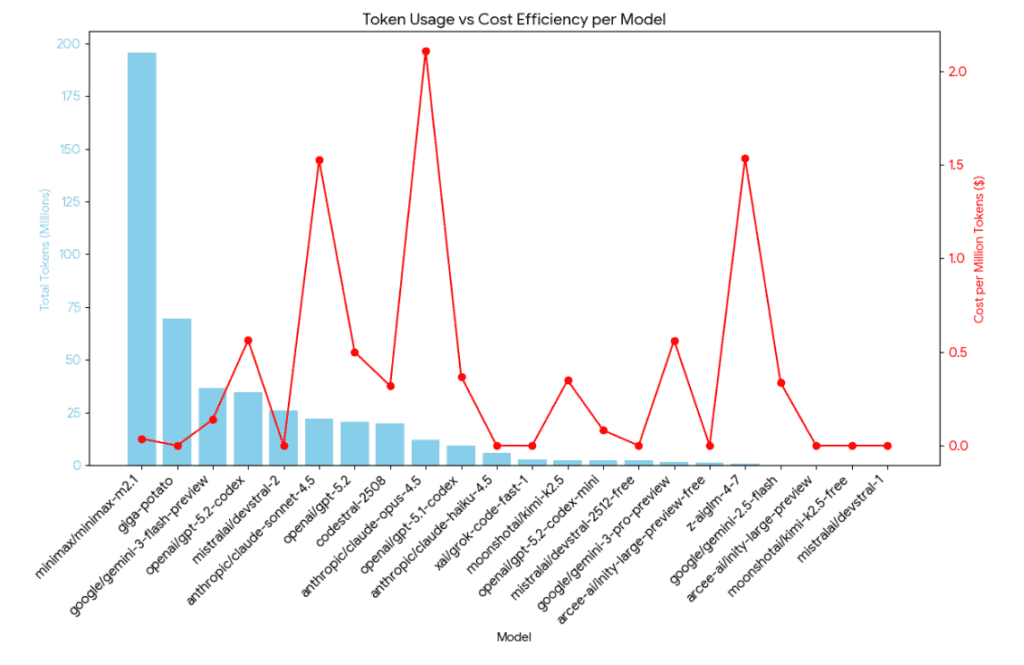
Here’s an efficiency breakdown, sorted by the bang-for-buck:
| Model | Total Tokens | Total Cost | Efficiency (Tokens per $1) |
| Giga-potato | 101.1 M | $0.00 | Free / Infinite |
| Devstral-2 | 25.6 M | $0.00 | Free / Infinite |
| Claude Haiku 4.5 | 13.0 M | $0.00 | Free / Infinite (promo?) |
| GPT-5.1 Codex Mini | 5.4 M | $0.21 | 25.9 Million |
| Minimax-M2.1 | 188.0 M | $9.38 | 20.0 Million |
| Gemini 3 Flash | 47.4 M | $4.80 | 9.8 Million |
| GPT-5.1 Codex | 16.6 M | $3.41 | 4.8 Million |
| Gemini 3 Pro | 3.1 M | $0.96 | 3.2 Million |
| GPT-5.2 Codex | 73.6 M | $22.75 | 3.2 Million |
| Codestral-2508 | 13.7 M | $5.30 | 2.5 Million |
| Claude 3 Opus | 12.4 M | $25.23 | 0.49 Million |
| Claude Sonnet 4.5 | 14.5 M | $34.02 | 0.42 Million |
A note about Claude Haiku 4.5: It is not free, but looks like I got a free ride for a little while.
Key Takeaways from My 45-Day Sprint
- The Rise of the Coding Assistant (Kilo Code & Codestral): My most frequent interactions were with
codestral-2508, clocking over 20,000 requests. This highlights the indispensable role of Kilo Code as my coding assistant. For rapid application development, nothing beats immediate, context-aware code suggestions and generation. While its “Tokens per $1” wasn’t the highest, its sheer volume of assistance was critical. It acted like a hyper-efficient junior developer, constantly churning out snippets, fixing typos, and completing boilerplate code, freeing me to focus on architectural decisions and complex logic. - Strategic Use of “Free” & High-Efficiency Models: Models with $0.00 cost (like
Claude Haiku 4.5,Giga-potato, andMistral/Devstral-2) were invaluable. These were likely used for less critical tasks, internal experiments, or benefit from promotional/free tiers.GPT-5.1 Codex MiniandMinimax-M2.1stood out as incredibly efficient paid options, providing millions of tokens per dollar. These became my workhorses for drafting documentation, generating larger code blocks, and processing extensive text data where cost-efficiency was paramount. - The “Premium” Powerhouses (and their Price Tag): The Anthropic Claude models (
OpusandSonnet) were my most expensive per token. These models excel in complex reasoning, nuanced understanding, and handling extensive context windows. I reserved them for critical tasks:- Architectural Brainstorming: Discussing high-level design patterns and trade-offs.
- Complex Algorithm Design: Getting detailed breakdowns and alternative approaches for intricate logic.
- Refactoring Guidance: Seeking advanced suggestions for improving code quality and performance.
- Deep Error Analysis: When standard debugging failed, these models often provided breakthrough insights.The higher cost was justified by the quality and depth of their responses, which saved me significant time on intellectually demanding problems.
- The Power of Caching: Models like
GPT-5.2andMinimax-M2.1showed strong “Cache Hit %.” This indicates effective reuse of repetitive prompts, system instructions, or large document contexts. Optimizing for caching is a subtle but powerful way to reduce costs, especially when iterating on similar problems or using consistent background context. - Diverse Models for Diverse Tasks: My data clearly shows that no single model did it all.
- Codestral (via Kilo Code): The rapid-fire coding assistant.
- Gemini Flash/Pro: Good for balanced performance and cost, likely used for general task assistance.
- GPT Codex variants: Strong for code-related queries, debugging, and understanding existing codebases.
- Claude Opus/Sonnet: The “thought partners” for complex problem-solving.
The Impact: Speed, Quality, and a New Workflow
Leveraging AI in this structured manner allowed me to achieve unprecedented development velocity. I estimate that Kilo Code and the complementary LLMs collectively boosted my productivity by at least 3x compared to traditional methods.
- Faster Prototyping: AI quickly generated initial structures and components.
- Reduced Debugging Time: AI-powered analysis helped pinpoint issues rapidly.
- Access to Expertise: I could tap into a vast knowledge base instantly, akin to having a team of experts at my fingertips.
- Consistent Quality: AI helped maintain coding standards and consistency across applications.
Looking Ahead
My 60-day sprint highlights a paradigm shift in software development. AI isn’t just a tool; it’s becoming an integral part of the development team. For those looking to accelerate their projects and build robust applications faster, I highly recommend:
- Embracing a dedicated coding assistant like Kilo Code for daily coding tasks.
- Strategically choosing LLMs based on the complexity and cost-sensitivity of the task.
- Optimizing for cache hits where possible to maximize efficiency.
- Context limits and usage MATTERS: Watch Context Size!
- Different LLMs have different capabilities: Some are good at complex tasks others are not. Use the right LLM for the task at hand!
Was it Worth It?
SHORT ANSWER: Absolutely. For an investment of just $120, I gained a deep understanding of both how to interact with the technology and the mechanics behind it. To date, I’ve built four production apps that are already integrated into my own workflows and some already being used by one of my client. One of these applications alone slashed my analysis time from two to three hours per week to just 10 minutes. That kind of efficiency is where the real value lies—the tools will easily pay for themselves.
We are witnessing a fundamental shift in technology: the democratization of software. We’ve reached a point where everyday people can build sophisticated, functional apps without writing a single line of code. The future of development is no longer gated by syntax; it is intelligent, collaborative, and incredibly fast. I’m excited to continue exploring these frontiers and pushing the boundaries of what’s possible with AI.
Have questions, ideas to share, or just want to connect? I’d love to hear from you! Check out my About Page to learn more about me or connect with me.