
Understanding RAG ChatBot Operating Costs: A Practical Guide
To learn more about Local AI topics, check out related posts in the Local AI Series
Back in 2024 I wrote a blog post: How Much Does It Cost to Operate AI ChatBots?
Please see my other post on ChatBots and RAG
Today I am updating it with a bit more knowledge and information and pointing you to the calcultor I have created and use to explain this concept.
Introduction
Building a Retrieval-Augmented Generation (RAG) chatbot is an exciting venture, but the “sticker shock” of operational costs can catch many developers and businesses off guard. Unlike traditional CRUD applications, RAG systems involve dynamic variables like token counts, vector embeddings, and specialized infrastructure.
To solve this, My AI coding assistant and I developed the RAG ChatBot Operating Cost Calculator. This guide explains the logic behind the tool, the architectural assumptions it makes, and how to accurately project your monthly expenses.
The Architecture Behind the Cost
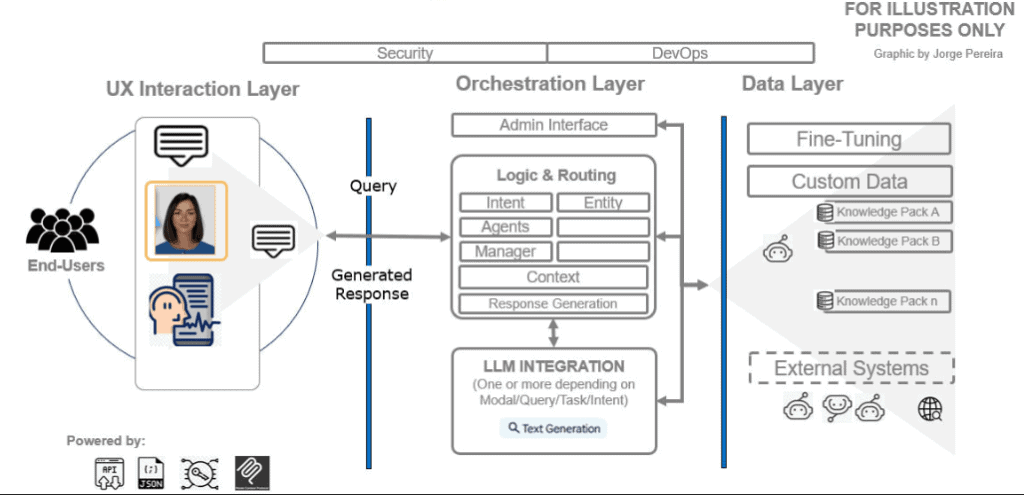
To understand the cost, we have to understand the flow. As shown in our system diagram, a RAG application is split into three main layers, each with its own “price tag”:
- UX Interaction Layer: Where users engage with the chatbot (and potentially expensive Avatars).
- Orchestration Layer: The “brain” (Logic & Routing) that manages LLM calls and context.
- Data Layer: Where your custom Knowledge Packs and external systems live.
The Three Pillars of RAG Expenses
1. Inference Costs (The “Running” Costs)
This is usually the largest slice of the pie (roughly 44% in our default scenario). Every time a user sends a message, you pay for both the “reading” (Input) and the “writing” (Output).
- The RAG Multiplier: In a standard chatbot, you only pay for the user’s question. In RAG, you pay for the user’s question plus several paragraphs of retrieved data from your database.
- The Calculator Logic:
- Input (Medium): 5,000 tokens (User query + context chunks).
- Output (Medium): 500 tokens (The actual response).
- Formula:
Daily Messages (Users × Hours × Msg/Hr) × 30 Days × Token Price.
Pro Tip: Choosing a model like GPT-4o Mini ($0.15/1M tokens) vs. GPT-4o ($5/1M tokens) can be the difference between a $200 bill and a $5,000 bill.
2. Knowledge Base & Storage
Your data doesn’t just “sit” there; it needs to be transformed and hosted.
- Vector DB Storage: To make data searchable by “meaning,” we store it as vectors. This adds about a 25% storage overhead compared to raw text.
- Document Storage: You still need to keep the original PDFs or Web Pages for re-indexing or manual review.
- One-Time Embedding Cost: When you first “Add a KB,” you pay a small fee to convert text into numbers (vectors). For 5,000 pages, this is often as low as $1.00.
3. Infrastructure & Hosting
Even if the AI is “serverless,” your application logic (the Orchestration Layer) is not.
The calculator assumes:
- Base Cost: $10/month for minimal hosting.
- Scalability: We add $0.50 per concurrent user to account for the RAM and CPU needed to maintain active connections.
- Server Sizing: The tool automatically suggests CPU and RAM requirements (e.g., 6.5 CPUs and 5 GB RAM for 50 concurrent users) to ensure your app doesn’t lag during peak hours.
A little deeper into: Traffic and Sizing
As with any AI Applicaiton it boils down to TOKENS! See blog post: Understanding AI Tokens: The Building Blocks of AI Applications
For the developers in the room, I’ve added two specific metrics to the calculator:
Expected Monthly Traffic
We estimate data flow using:

The formula is estimating monthly network traffic in gigabytes based on message volume and token usage. Here’s what each part represents:
- Monthly Msgs — total number of messages sent in a month
- Tokens — average number of tokens per message
- 4 bytes — assumed size per token (typical for UTF-8 / 32-bit representation)
- 1.2 overhead — a 20% multiplier to account for protocol overhead (headers, metadata, framing, etc.)
- 1024³ — converts bytes to gigabytes (GiB)
So conceptually:
Traffic (GB) = total tokens per month × bytes per token × overhead, converted to GB
It’s a reasonable back-of-the-envelope model for estimating bandwidth usage, assuming:
- tokens are roughly fixed-size,
- overhead is proportional to payload,
- and you’re measuring in GiB, not decimal GB.
This helps you budget for egress fees if you are hosting on AWS or Azure.
Level 1 to Level 3 Agents
Our architecture supports three levels of autonomy:
- Level 1: Simple Automations (FAQ bots).
- Level 2: AI-Enabled Workflows (n8n integrations, data processing).
- Level 3: Autonomous Agents (Goal-oriented, self-correcting).Higher levels typically require more “Reasoning” tokens, increasing the Inference cost.
How to Optimize Your Budget
- Right-size your Model: Use DeepSeek V3 or GPT-4o Mini for routing and simple tasks; save the “expensive” models for final response generation.
- Tighten your Context: Reducing your RAG retrieval from 10 chunks to 3 chunks can cut your input costs by 60%.
- Monitor “Avatar” Usage: As noted in our assumptions, Avatar rendering is the most hardware-intensive item. If you don’t need a talking head, stick to text to save on hosting.
Conclusion
Estimating AI costs shouldn’t be guesswork. By breaking down your usage parameters and understanding the interplay between storage and inference, you can build sustainable AI products.