Demystifying AI Loops: How Modern AI Learns to Self-Correct

Part of: AI Learning Series Here
Quick Links: Resources for Learning AI | Keep up with AI | List of AI Tools | Local AI | AI Agents | Future of Work
Subscribe to JorgeTechBits newsletter
Explore the Latest Token Prices
Disclaimer: I create this content entirely on my own time, and the views expressed here are mine alone (not my employer’s). Because I love leveraging new tech, I use AI tools like Gemini, ChatGPT, Claude, Perplexity and others as a “digital team” to help research and polish these articles so I can share the best possible insights with you!
Have questions, ideas to share, or just want to connect? I’d love to hear from you! Check out my About Page to learn more about me or connect with me.
If you have used a standard AI chat interface, you are probably familiar with traditional prompting. You type a question, wait a few seconds, and get an answer. If the answer is wrong, you type another prompt to fix it.
This is called “single-shot” prompting, and while it feels magical at first, it has a massive flaw: it’s brittle. If the AI makes a mistake, hallucinates, or hits a broken link, the whole process grinds to a halt.
But the AI landscape is shifting under our feet. We are witnessing the explosive rise of Autonomous AI Agents. Whether they are personal agentic desktop assistants managing your daily schedule, or enterprise-grade backend agents running complex supply chains and security monitoring behind the scenes, these systems don’t just sit around waiting for your next prompt. They are designed to take a goal and run with it.
At the very core of this agentic revolution is a single, powerful design pattern: the AI Loop (also known as an agentic loop). It is the mechanism shifting AI from a static, passive question-and-answer tool into an active, autonomous partner that can think, act, fail, and self-correct until the job is done right.
See my other posts on AI Agents and Agentic AI
What Exactly is an AI Loop, and When is it Used?
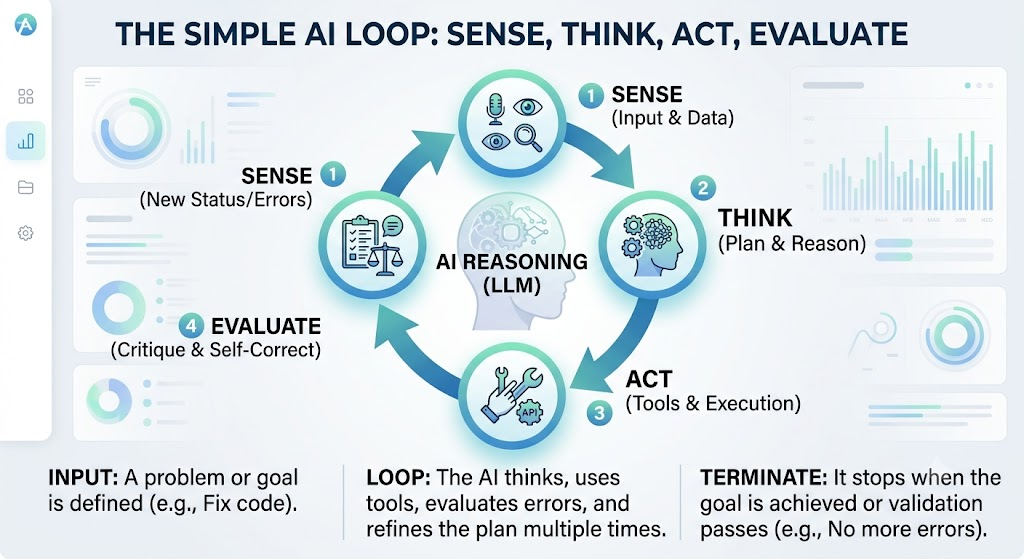
An AI loop is a design pattern where an AI system is embedded inside a continuous cycle of sensing data, reasoning through a problem, taking an action using external tools, and evaluating its own success.
Instead of trying to guess the perfect answer in one go, the AI behaves more like a human worker: it takes a shot at the problem, checks its work, fixes its mistakes, and stops only when a specific goal or termination condition is met.
We deploy AI loops when a task is too complex or unpredictable to be solved in a single step. They are ideal for:
- Multi-step workflows that require planning, execution, and verification.
- Ambiguous goals where the exact path to a solution isn’t known upfront.
- Dynamic environments where the AI must react to real-time data, API responses, or system errors.
- High-precision environments where errors are costly and the AI needs to double-check its work before finalizing.
Code vs. Prompts: Why AI Loops are Radically Different
A common question is: Is an AI loop made of code or prompts?
The answer is both. It is a bridge where traditional code acts as the “nervous system and muscles” (handling structure, while/until control flows, and tool APIs), while prompts act as the dynamic “brain” (handling the reasoning, log analysis, and decision-making).
Because of this hybrid nature, AI loops behave entirely differently than traditional software or standard LLMs:
| Feature | Traditional Software Loops | Standard LLM (Single-Shot) | AI Loops (Agentic) |
| Logic Driver | Hardcoded if/else or while rules. | Static probabilistic next-token prediction. | Dynamic LLM reasoning guides the next iteration. |
| Flexibility | Rigorous, brittle; fails on unexpected inputs. | Adaptive, but prone to hallucinating on complex tasks. | Highly adaptive; can pivot strategies based on mid-loop errors. |
| Tool Usage | Explicitly programmed integration. | No tool use (or limited single-step tool calling). | Autonomous tool selection (Search, APIs, databases) as needed. |
| Self-Correction | Requires manual error handling catch blocks. | Cannot correct itself unless the user reprompts. | Inherent self-correction by evaluating its own output. |
Real-World Examples of AI Loops in Action
To see how these concepts translate into practice, it helps to look at the diverse ways agentic orchestration is currently being deployed. While the underlying logic remains the same—sensing, thinking, acting, and evaluating—the actual applications span across industries ranging from software development to cybersecurity. The table below outlines ten real-world examples of how AI loops are transforming complex, multi-step tasks into streamlined, autonomous workflows:
| AI Loop Example | How It Works in Action |
| The Coding & Debugging Loop | The AI writes a script, runs it in a containerized environment, captures the compiler/runtime error, analyzes the logs, and rewrites the code. It loops until the code executes with a 0 exit code and passes all unit tests. |
| Autonomous Web Research | An AI search agent is given a broad topic. It searches the web, reads the top results, realizes it needs deeper information on a subtopic, performs a new targeted search, compiles the data, and loops until it fills all gaps in its research outline. |
| Human-in-the-Loop Content Generation | The AI drafts an article, then pauses and prompts a human editor for feedback. The human might say, “Make the tone more casual.” The AI rewrites it, asks for approval again, and repeats this loop until the human clicks “Publish.” |
| RLHF (Training Loop) | Used during AI model training. The model generates multiple responses; humans (or critique models) rank them. This feedback is looped back into the training algorithm to update the model’s weights, continuously refining its alignment. |
| AI Customer Support Escalation | A chatbot converses with a user to diagnose a technical issue. It asks a question, analyzes the user’s response, checks an internal knowledge base, and proposes a solution. If the user says “that didn’t work,” the loop continues with an alternative fix until resolution or human handover. |
| Automated Prompt Optimization | An AI system is given a task and a dataset. It generates a prompt, tests it against the dataset, evaluates the accuracy of the outputs, tweaks the prompt phrasing or few-shot examples, and runs the test again to maximize the overall performance score. |
| Document Analysis & Cross-Referencing | When analyzing a massive legal contract or financial portfolio, the AI reads a clause, queries a vector database to find related clauses across other documents, verifies consistency, and loops through the entire document set to map dependencies and anomalies. |
| Cyber Security Threat Hunting | An AI agent continuously monitors network logs. It detects a suspicious IP, queries a threat intelligence API, decides to isolate the affected container, checks if the malicious activity stopped, and loops back to scan for further indicators of compromise. |
| Autonomous Database Migration | The AI converts a legacy database schema to a modern one (e.g., MySQL to MongoDB). It migrates a batch of data, runs validation queries to ensure data integrity, logs mismatches, adjusts the transformation mapping script, and reruns the batch until zero data loss is achieved. |
| AI Supply Chain Optimization | The system reviews inventory levels. It checks weather patterns and shipping delays via API, adjusts ordering quantities, simulates the cost impact, re-checks warehouse constraints, and runs this loop daily to output optimized purchase orders. |
Is Designing AI Loops a Skill? Do You Need to Code?
Building and working with AI loops is absolutely a skill—rapidly becoming known as Agentic Engineering or AI Orchestration. It requires a blend of Loop Orchestration (managing state and tool integration), Meta-Prompting (prompting an AI to critique its own work), and System Design.
However, regular users do not need to know coding to build them anymore.
The landscape has shifted to No-Code / Low-Code Automation Platforms like n8n, Make, and Zapier. Instead of writing complex Python syntax, regular users can drag and drop visual blocks (nodes) on a canvas, drawing arrows to route data back into an AI node for evaluation. Furthermore, modern agentic user interfaces (like Perplexity or Manus AI) have these loops entirely baked into the background, doing the looping for you.
The skill for the everyday user has shifted from syntax to logic—learning how to think like a manager, break down problems step-by-step, and give clear, iterative instructions.
Here is a new, highly relevant section you can add to the blog post, positioned right before the examples or the closing thoughts to really drive home the engineering shift.
Why the Loop Needs an LLM?
It is easy to look at an AI loop and think, “Isn’t this just regular software automation with a fancy name?”
Not quite. While traditional software code handles the rigid mechanics—like running the while loops, setting timers, and executing API calls—it lacks a crucial trait: adaptability. Traditional programming code is notoriously brittle. If a website changes its layout slightly, or a server throws an unexpected error, a standard program doesn’t know how to adapt; it simply crashes.
This is why an LLM is the indispensable “brain” of the loop. It brings unique capabilities that traditional code cannot match:
- Navigating the “Messy Middle”: When a tool fails or a database query times out, the raw error logs are captured by the code and handed straight to the LLM. The model reads the error, understands the context of the failure, and dynamically invents an alternative strategy on the fly.
- Semantic Judgment: Code is exceptional at checking if a number is greater than 10, but it cannot judge human nuance. In the evaluation phase of a loop, the LLM acts as the ultimate quality critic, answering subjective questions like: “Does this draft match the brand’s tone, and is it genuinely helpful to the reader?”
- Dynamic Tool Routing: Instead of a developer hardcoding a massive web of strict
if/elserules for every possible scenario, the LLM uses natural language reasoning to look at the current state of a problem and decide exactly which tool to pull out of its toolkit next.
In short, if traditional code provides the engine, wheels, and frame of the vehicle, the LLM is the intelligent driver behind the wheel—constantly reading the road signs, navigating unexpected traffic detours, and steering the loop safely to its final destination.
Keeping the Loop on a Leash: Keeping It Safe
If an AI is left to loop indefinitely, it could run in circles forever, spiking your compute costs. To prevent this, creators build three specific “guardrails” into every loop to tell it exactly when to stop:
- Success Conditions (Goal Achieved): Objective metrics (like a code passing validation with zero errors) or an AI-driven evaluation step where a secondary prompt acts as a quality inspector and gives a final green light.
- Safety Guards (Resource Limits): Hardcoded safety nets, such as a Max Iterations limit (e.g., “stop and exit if you haven’t solved this in 5 tries”) or strict token/cost budgets.
- Human-in-the-Loop (HITL Interruption): Approval gates where the loop pauses at a critical juncture (like sending an email or publishing code) and waits for a human to click “Approve” or “Reject with feedback.”
Final thoughts:
We are moving away from the era of static prompting and entering the era of system orchestration. The true value of AI going forward isn’t in knowing a magic keyword to type into a prompt box; it’s in knowing how to build a resilient, self-correcting system that allows AI to test, learn, and iterate its way to a perfect solution.