
Beyond Docker Hub: Exploring Private Container Registries

Disclaimer: I create this content entirely on my own time, and the views expressed here are mine alone (not my employer’s). Because I love leveraging new tech, I use AI tools like Gemini, ChatGPT, Claude, Perplexity and others as a “digital team” to help research and polish these articles so I can share the best possible insights with you!
Understanding your options for storing, managing, and distributing private Docker images while balancing cost, control, and infrastructure complexity.
If you work with Docker containers long enough, you eventually face a question that doesn’t get much attention when you’re starting out: Where should you keep your private container images?
When you’re experimenting with one or two applications, the answer is usually simple. Docker Hub or another hosted registry works, the setup is easy, and there isn’t much to think about. But as your environment grows, things change. You might have multiple applications, custom services, private images, automated builds, and several servers that need access to those images.
At some point, it’s worth considering whether your current approach still makes sense, both technically and economically.
You could continue using a hosted registry such as Docker Hub or GitHub Container Registry. You could run your own registry and store everything on your existing VPS. Or you could separate the registry from its storage, keeping the image data in Amazon S3, Cloudflare R2, MinIO, or another storage platform.
Each approach has advantages, tradeoffs, and different cost considerations. And perhaps most importantly, running your own private registry doesn’t mean you need expensive infrastructure or publicly accessible storage.
What makes this interesting is that the registry itself and the storage holding your container images don’t necessarily have to live in the same place. Understanding that separation opens up several architectural and economic possibilities, including some surprisingly inexpensive options.
Let’s explore how container registries work, the alternatives available, what they actually cost, and when each approach makes sense.
First, What Does a Container Registry Actually Do?
A container registry is essentially a place where container images are stored and made available to other systems.
When you build a Docker image, you typically push it to a registry. When another server needs to run that application, it pulls the image from the registry. This process is fundamental to container-based development, automated deployment pipelines, and modern application infrastructure.
What makes container images interesting is that they aren’t stored as one large file. They’re made up of layers, with manifests describing how those layers fit together. Multiple images can share layers, reducing duplication and making storage and distribution more efficient.
The registry manages this structure, handles requests from Docker clients, and connects the image metadata to the underlying storage.
Most developers start with Docker Hub because it’s convenient and integrated into the Docker ecosystem. However, private repositories, usage limits, storage policies, and subscription costs can become considerations as environments expand.
That’s when it makes sense to look at the alternatives.
The Three Main Approaches to Private Container Hosting
There are three broad ways to manage private Docker images, each with different advantages.
1. Hosted Container Registries
The simplest approach is to use a service that manages the registry infrastructure for you.
Examples include GitHub Container Registry (GHCR), GitLab Container Registry, and Docker Hub. These services handle the underlying storage, registry availability, authentication infrastructure, and much of the operational complexity.
If your source code already lives on GitHub or GitLab, their integrated registries are particularly attractive. Your build pipelines, access permissions, and container images can all exist within the same ecosystem.
For many independent developers and small teams, this is probably the best starting point. There’s very little infrastructure to maintain, and free or low-cost allowances may be sufficient.
The tradeoff is that you’re operating within someone else’s pricing structure, retention policies, and service limitations. Those policies can change, so it’s worth reviewing current terms rather than assuming that a particular storage or bandwidth allowance will always be available.
2. Managed Cloud Container Registries
The second option is to use a registry provided by your cloud infrastructure provider.
Amazon Elastic Container Registry (ECR), Google Artifact Registry, and Azure Container Registry are examples.
These services are particularly useful when your applications already run within the same cloud environment. They integrate with cloud identity systems, deployment services, networking, monitoring, and security controls.
If you’re running applications on AWS, for example, ECR may be more convenient than managing a separate registry yourself.
The disadvantage is that costs and architecture become tied to the cloud provider. Storage, image scanning, replication, and data transfers may contribute to your bill, depending on the service and configuration.
For organizations already committed to a particular cloud ecosystem, these integrations often outweigh the costs.
3. Self-Hosted Container Registries
The third approach is to run your own registry.
The open-source CNCF Distribution project, commonly known as the Docker Registry, provides the core technology needed to operate a container image registry on your own infrastructure.
You can run it on a VPS, dedicated server, virtual machine, or Kubernetes environment.
This gives you more control over where images are stored, who can access them, and how the registry integrates with your existing infrastructure.
However, it also makes you responsible for availability, authentication, TLS certificates, backups, monitoring, maintenance, and security.
And that brings us to an important architectural decision: where should the registry actually store its data?
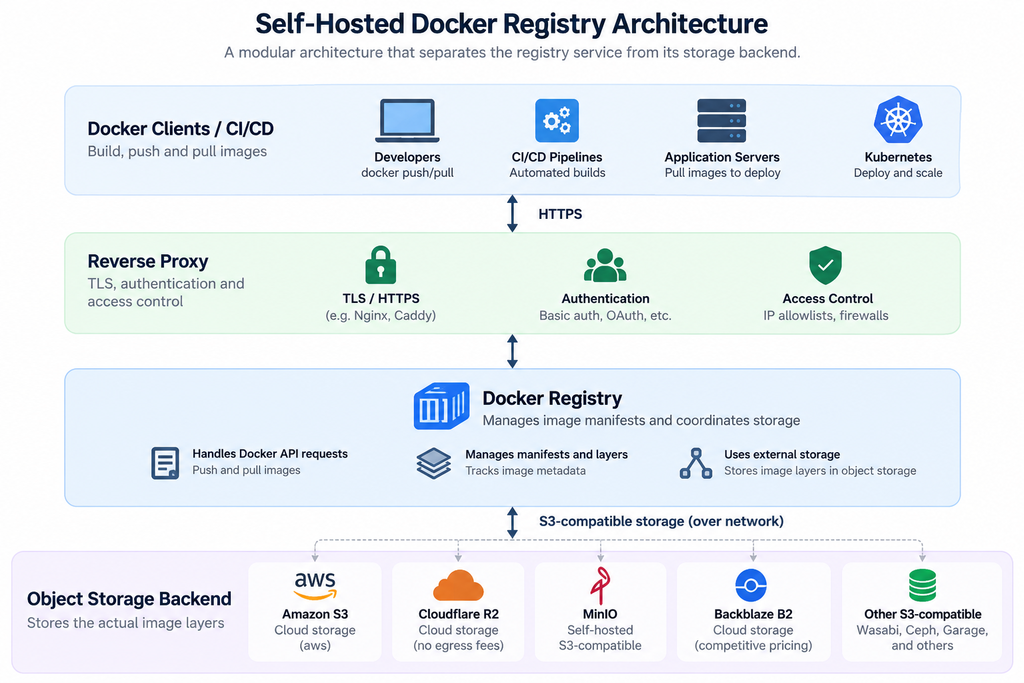
Separating the Registry from Its Storage
One of the most useful features of the open-source Docker Registry is its support for different storage backends.
The registry itself doesn’t have to keep all its container image layers on the local filesystem. Instead, it can use an external object storage service.
This means you can operate a relatively lightweight registry service on one server while keeping the potentially much larger collection of image layers somewhere else.
Think of it as separating the service that manages and distributes your images from the infrastructure responsible for storing them.
For example, your registry might run on a small VPS, while its storage backend lives in an Amazon S3 bucket or a Cloudflare R2 bucket. Alternatively, you could use MinIO to provide S3-compatible object storage on infrastructure you control.
This separation can be especially useful when your VPS has limited disk capacity, or when you want storage growth to be managed independently of the server running the registry.
It doesn’t eliminate storage costs or operational responsibilities, but it gives you more flexibility in how you handle them.
Amazon S3: Familiar, Durable, and Widely Supported
Amazon S3 is one of the most established object storage platforms, and the Docker Registry supports it through a native storage driver.
With this approach, your registry continues to provide the interface used by Docker clients, but the image data is stored in an S3 bucket rather than on the registry server’s local disk.
The benefits are straightforward. You gain access to highly durable object storage, flexible capacity, mature access controls, and the broader AWS ecosystem.
However, storage capacity is only one part of the cost equation.
S3 charges can include the amount of data stored, API requests, and data transferred out of AWS. Depending on where your registry and deployment servers operate, data transfer charges can become significant.
For example, imagine running your registry on a VPS outside AWS while storing its images in S3. When the registry retrieves image layers from S3, those transfers may incur AWS egress charges. If you frequently deploy large images, the cost can grow even if the actual amount of stored data remains relatively small.
There are also architectural details to consider. A registry can proxy image data through its own server or, with supported configurations, redirect clients to storage URLs. That affects network traffic, security, and potentially cost.
S3 is an excellent option when you’re already using AWS or value its durability and operational maturity. It may be less economically attractive when your infrastructure sits outside AWS and frequently retrieves large amounts of data.
Cloudflare R2: An Interesting Alternative for Distributed Infrastructure
Cloudflare R2 approaches object storage economics differently.
Its most notable characteristic is that it does not charge standard data egress fees for retrieving objects. That can make it attractive for container registries serving images to servers spread across different hosting providers or geographic locations.
R2 also provides an S3-compatible API, which allows many applications designed for S3 to work with R2, although compatibility details and configuration requirements should always be verified.
Consider a scenario where you’re running several VPS instances across different hosting providers. Each server periodically pulls updated application images from your private registry.
With traditional cloud object storage, repeated transfers out of the storage provider may contribute to your bill. With R2, the absence of standard egress charges removes one important variable.
That doesn’t mean R2 is free. Storage capacity and certain operations are billed, and the registry server or hosting provider may have its own network costs.
Still, the pricing model can be particularly appealing for developers who want a central private registry serving applications across multiple environments.
For a small self-hosted infrastructure spread across several servers, R2 is worth evaluating.
MinIO: Object Storage on Infrastructure You Control
MinIO takes a different approach.
Rather than renting object storage capacity from a cloud provider, you run an S3-compatible object storage service on your own infrastructure.
That could be a dedicated server, a virtual machine, or a storage system within your private network.
Your Docker Registry communicates with MinIO using an S3-compatible interface, but the underlying storage is managed by you.
The attraction is control. You determine where the data lives, how storage is provisioned, and how the system is integrated with your environment.
For organizations with existing infrastructure, that can be useful. It may also appeal to homelab operators, developers with dedicated storage servers, or teams with data residency requirements.
But self-hosted storage is not automatically cheaper.
You’re still paying for disks, servers, networking, backups, and the time required to maintain the system. If MinIO runs on the same VPS as the registry, you’ve also potentially recreated the original disk-capacity problem, just with an additional software layer.
MinIO becomes more interesting when you already have suitable storage infrastructure or need the operational control it provides.
It’s also worth checking the current MinIO product, licensing, and distribution options before selecting it for a new deployment, rather than assuming every historical community deployment model remains unchanged.
Other Alternatives Worth Knowing About
The S3-compatible storage ecosystem extends beyond Amazon S3, R2, and MinIO.
Backblaze B2 provides another cloud object storage option with competitive capacity pricing and S3-compatible access. Wasabi offers an alternative pricing model, although minimum retention periods and other billing conditions deserve attention.
For more advanced self-hosted environments, technologies such as Ceph and Garage provide object storage capabilities suitable for distributed infrastructure.
These options can make sense when you have specific requirements around resilience, geographic distribution, existing hardware, or operational control.
However, S3 compatibility isn’t a guarantee that every registry feature works identically across providers. Authentication methods, multipart uploads, redirects, consistency behavior, and configuration details can differ.
The important point is that your registry and storage provider are separate architectural choices. You aren’t necessarily locked into one storage platform simply because you selected a particular registry implementation.
What Does It Actually Cost?
One of the mistakes we can make when comparing storage platforms is focusing entirely on the cost per gigabyte.
For a container registry, that’s only part of the picture.
Imagine a relatively small environment containing 20 GB of private container images. That doesn’t sound like much storage, and for most object storage platforms, the monthly capacity charge would be modest.
Now imagine those images are being pulled repeatedly by development servers, production systems, and automated deployment pipelines, resulting in 200 GB of monthly image transfers.
Suddenly, the economics change.
With Amazon S3, some of that transfer activity may generate egress charges, depending on the network paths involved. With Cloudflare R2, standard object egress charges are not part of the model, although operation and infrastructure costs still apply.
With MinIO, the object storage software may run on infrastructure you’ve already paid for, but you’re responsible for its capacity, availability, and network traffic.
And with a hosted registry such as GHCR, your costs depend on the service’s current storage and bandwidth policies, including which transfers qualify for included allowances.
The practical lesson is that storage cost, transfer cost, and operational cost should be evaluated together.
A platform with a higher per-gigabyte storage price can sometimes be less expensive overall if it eliminates costly data transfers. Conversely, a fully self-hosted solution may cost more than a hosted service once maintenance time is considered.
Don’t Forget About Image Growth and Retention
There’s another factor that deserves attention: container registries tend to accumulate data over time.
Every new application build may introduce additional layers. Some layers are shared across images, while others are unique to particular versions.
Even if you continually push images using the same tag, older image data may remain in the registry.
Deleting a tag doesn’t necessarily remove the associated image layers, and deleting a manifest doesn’t automatically guarantee that every underlying storage object can be reclaimed.
Registry implementations typically require deliberate retention and garbage collection procedures to remove unreferenced content safely.
This matters regardless of whether you’re using local disk, S3, R2, or MinIO. Object storage makes capacity easier to expand, but it doesn’t automatically make unnecessary data disappear.
For a small environment, a simple retention strategy may be enough. For larger environments, lifecycle management, backup policies, and automated cleanup become more important.
It’s also worth remembering that object storage lifecycle rules are not a substitute for registry-aware cleanup. Removing objects directly from the storage backend can damage a registry if those objects are still referenced by manifests.
So, Which Option Makes Sense?
There isn’t one universally correct answer.
If you’re an independent developer with a handful of private images, GitHub Container Registry or another hosted option may be the simplest and most economical solution. There’s little reason to introduce additional infrastructure if the hosted service already meets your needs.
If your applications are tightly integrated with AWS, Azure, or Google Cloud, using that provider’s managed registry often makes operational sense.
If you already operate your own VPS infrastructure and want greater control over private images, a self-hosted Docker Registry becomes an interesting option.
From there, the storage decision depends on your priorities.
Amazon S3 is attractive for AWS-centric environments where durability, integration, and managed storage are important. Cloudflare R2 deserves consideration when images are distributed across different hosting providers and avoiding standard egress charges is valuable.
MinIO or another self-hosted object storage platform makes more sense when you already have storage infrastructure or want direct control over where your image data resides.
And there’s nothing wrong with using local filesystem storage for a small registry, provided you have sufficient capacity, reliable backups, and a sensible retention strategy. External object storage is an option, not a requirement.
The Bigger Picture: Separating Services from Storage
What makes this topic interesting goes beyond Docker.
Separating an application service from its underlying storage is a common architectural pattern, and container registries provide a practical example of why that separation matters.
It allows storage capacity to grow independently, creates flexibility in infrastructure placement, and gives you more choices about how costs are managed.
But flexibility doesn’t automatically mean lower cost or less complexity. Every additional component introduces dependencies, operational responsibilities, and potential failure points.
The objective shouldn’t be to self-host everything simply because you can. It should be to understand where managed services provide value and where greater control is worth the additional effort.
For anyone running multiple Docker applications, particularly across VPS environments or hybrid infrastructure, private container storage is worth examining before it becomes a problem.
You might discover that a hosted registry is all you need. Or you might find that a lightweight self-hosted registry paired with external object storage gives you the right balance of control, flexibility, and cost.
The important part is knowing you have choices.
The Economics: How Much Does Private Container Storage Really Cost?
One of the more interesting discoveries when comparing container registry storage options is just how inexpensive the actual storage can be. The bigger expense isn’t necessarily keeping the images somewhere; it’s transferring those images to the servers that need them.
Let’s consider a relatively small private Docker registry containing 10 GB of images. This might represent several applications, multiple versions, and a collection of custom services.
Here’s how some of the storage alternatives compare.
| Storage backend | Monthly cost for 10 GB | Data transfer (egress) | Other considerations |
|---|---|---|---|
| Amazon S3 Standard | ~$0.23 | Free eligible allowance, then usage-based | API requests may add costs |
| Cloudflare R2 Standard | $0.00 | Free | Generous ongoing free tier |
| Backblaze B2 | $0.00 within free tier | Limited free allowance, then usage-based | API and transfer policies apply |
| Wasabi | ~$7.99 minimum | No standard egress fees, subject to policy | 1 TB minimum billing |
| MinIO AIStor Free | $0 software license | Depends on hosting | Requires your own infrastructure |
| Local VPS storage | $0 incremental if available | Depends on hosting | Uses existing disk capacity; no separate storage service required |
These are approximate US pricing comparisons for storage over one month, excluding registry hosting, optional services, and taxes. Pricing and free-tier allowances may change.
Does Local VPS Storage Need to Be Accessible from the Internet?
No. One important architectural distinction is that the Docker Registry needs to be accessible to the systems using it, but the underlying storage does not necessarily need to be publicly accessible.
If you’re running a registry and storing its images on the same VPS, the registry can use a local directory on the server’s filesystem. Docker clients communicate with the registry, and the registry handles access to the stored images. The storage directory itself is never directly exposed to the internet.
If the storage resides on another server, the registry can communicate with it through a private network, VPN, or internal connection. For example, a MinIO server could provide S3-compatible storage without exposing its storage API publicly.
There is one exception worth understanding. Some registry configurations redirect Docker clients to object storage URLs for image downloads. In those cases, the clients must be able to reach the storage endpoint. If the registry handles the data transfer itself, the storage backend can remain private.
This means that you can operate a publicly accessible private Docker Registry while keeping the actual storage isolated from the public internet. Naturally, the registry itself should still be protected with HTTPS, authentication, and appropriate access controls.
For smaller environments, using existing VPS disk space may be the simplest option. There’s no need to introduce an additional storage platform unless capacity, reliability, scalability, or infrastructure requirements justify it.
Why Cloudflare R2 Is Particularly Interesting
Cloudflare R2 stands out because its Standard storage tier includes an ongoing free allowance rather than a short introductory trial.
At the time of writing, that allowance includes:
- 10 GB-month of Standard storage.
- 1 million Class A operations per month, such as writes and listing objects.
- 10 million Class B operations per month, such as reads.
- No standard data egress charges.
That means a small registry containing 10 GB of images could potentially operate with $0 in R2 storage and transfer charges, even when those images are downloaded repeatedly by different servers.
For example, a registry storing 10 GB and transferring 200 GB of images during the month could still remain within R2’s free tier, provided the API operations stay within their allowances.
When Does Cloudflare R2 Start Charging?
The storage charges begin once your average monthly Standard storage consumption exceeds the included 10 GB-month allowance. Additional storage is billed at approximately $0.015 per GB-month.
Here’s what that looks like:
| Average storage used | Estimated monthly R2 storage cost |
|---|---|
| 5 GB | $0.00 |
| 10 GB | $0.00 |
| 20 GB | $0.15 |
| 50 GB | $0.60 |
| 100 GB | $1.35 |
| 500 GB | $7.35 |
| 1,000 GB (1 TB decimal) | $14.85 |
Estimates assume Standard storage throughout the month and API usage within the free allowances.
There is an important distinction here: R2 can start charging even when you’re storing less than 10 GB if your API request volume exceeds the free limits. Additional Class A operations cost approximately $4.50 per million, while additional Class B operations cost approximately $0.36 per million.
And although R2 doesn’t charge standard egress fees, the VPS running your registry may still have its own bandwidth or hosting costs.
What Does This Mean for a Small Private Registry?
If you’re running a handful of Docker applications across one or several VPS instances, you have several practical choices.
You can store the images directly on the VPS running the registry, keeping everything simple and avoiding an additional storage service. You can use a separate private storage server when you need more capacity or want to isolate storage from the registry. Or you can use a cloud object storage provider such as Cloudflare R2 to separate image storage from your VPS entirely.
Cloudflare R2 can be particularly economical because of its free storage allowance and lack of standard egress charges. However, using local disk space you already have may be even simpler and require fewer moving parts.
The key is that self-hosting a registry doesn’t mean you must expose your storage to the internet, nor does it mean you must use an external object storage provider.
A hosted registry such as GitHub Container Registry may still be the easiest solution for many developers. But for those already operating Docker infrastructure, understanding these storage alternatives provides greater flexibility in balancing cost, control, and operational complexity.
Further Reading
- CNCF Distribution — Container Registry
- Docker Hub
- GitHub Container Registry
- Amazon S3 Pricing
- Cloudflare R2 | Cloudflare R2 Pricing.
- MinIO
For the article, I would place your preferred architecture illustration immediately after “Separating the Registry from Its Storage.” That is the point where a visual explanation has the most value.
I’ve deliberately avoided specific monthly price claims because provider pricing and free-tier conditions change. The draft also avoids prescribing an implementation, while retaining enough technical depth to help readers make an informed decision.
Have questions, ideas to share, or just want to connect? I’d love to hear from you! Check out my About Page to learn more about me or connect with me.