Balancing One-Click Access with Data Privacy
AI Disclaimer I love exploring new technology, and that includes using AI to help with research and editing! My digital “team” includes tools like Google Gemini, Notebook LM, Microsoft Copilot, Perplexity.ai, Claude.ai, and others as needed. They help me gather insights and polish content—so you get the best, most up-to-date information possible.
This is part of my continuous learning on my DevLog topic.
When managing a private community directory—containing sensitive member details like names, home addresses, and personal emails—the biggest hurdle is access friction. You want your group members (whether they are on Facebook, WhatsApp, or Slack) to click a link and get in instantly. However, standard security (like a shared password) is often forgotten, while “open” links risk exposing your members’ private lives to the entire internet.
I had to deep dive into this problem, and my research led me to a solution isn’t just a link—it’s a behavioral gate, which I thought I would document for others to learn from.
Before diving into solutions, let’s identify WHO we’re protecting against and WHAT attack vectors exist:
Understanding the Threat Model
Threat Actors:
- Curious Members: Well-meaning users who may share links without realizing they’re exposing passwords embedded in URLs
- Link Scrapers: Automated bots that harvest and index URLs from public social media posts
- Malicious Actors: Individuals actively seeking to access private community data
- Accidental Exposure: Search engines indexing URLs with embedded credentials
Attack Vectors:
- Referrer Leaks: When members click external links from your directory, the full URL (including any tokens) appears in HTTP referrer headers sent to external sites
- Browser History: Passwords in URLs persist in browser autocomplete, history, and sync across devices
- URL Sharing: Copy-paste behavior accidentally spreads credentials through comments, forwards, and screenshots
- Link Preview Bots: Services like Slack, Discord, and Facebook automatically fetch URLs to generate previews, potentially triggering unauthorized access
Understanding these threats helps us evaluate why certain solutions fail and others succeed.
The Bitly Transparency Issue: Why Link Shortening Fails
Many administrators try to solve access friction by shortening a “secret” URL (like yoursite.com/dir?token=Secret123) using Bitly. This approach represents a dangerous “security through obscurity” tactic that provides a false sense of protection.
The Bitly Analytics Endpoint:
Bitly provides a public analytics feature accessible by appending a plus sign (+) to any Bitly link. For example, if your shortened link is bit.ly/abc123, visiting bit.ly/abc123+ opens a public information page that reveals:
- Full destination URL: Including all query parameters, tokens, and passwords
- Click statistics: Total clicks and geographic distribution
- Creation timestamp: When the link was generated
- Referrer data: Where clicks originated from
Security Implication:
If your shortened URL is:
bit.ly/private → yoursite.com/directory?password=SecretPass123
Anyone can discover your password by visiting:
bit.ly/private+
This violates the principle of defense in depth. Bitly acts more like a transparent window than a security mask. To a curious outsider, link scraper, or anyone who understands this feature, your secret access key becomes public knowledge.
Why This Matters:
Link shorteners were designed for convenience and analytics, not security. Using them to hide sensitive parameters is a fundamental misuse of the tool. The shortened URL may look opaque, but it’s trivially reversible.
4 Tiers of One-Click Access – A Technical Comparison
We evaluated four different approaches to handle the “auto-login” requirement. Each tier represents a different architectural pattern with distinct security characteristics.
| Tier | Method | User Experience | Security Level | Technical Explanation |
|---|---|---|---|---|
| 1 | URL Parameter Authentication | 10/10 (Perfect) | Low | Password embedded directly in URL (e.g., site.com/dir?pass=secret). Risk: Visible in browser address bar, history, server logs, and referrer headers when users navigate away. Persists in browser autocomplete. |
| 2 | Iframe Embedding | 4/10 (Poor mobile) | Low | Gateway page embeds directory in iframe with credentials in the iframe src. Risk: Breaks on mobile browsers with iframe restrictions. “View source” reveals the real URL with credentials. Offers no actual security. |
| 3 | Client-Side URL Cleaning | 9/10 (Good) | Medium | URL contains credentials initially, but JavaScript removes them from the address bar after page load. Risk: Credentials still appear in browser history, server logs, and referrer headers. The cleaning happens too late to prevent exposure. |
| 4 | Server-Side POST Authentication | 8/10 (Very Good) | High | Gateway page contains a hidden form that submits credentials via POST request body. Security: Credentials never appear in URL, browser history is clean, referrer headers don’t leak passwords. Requires one additional click. |
Key Insight: The fundamental difference between these tiers is WHERE the credential lives during transmission. Tiers 1-3 all place credentials in the URL at some point, which means they’re exposed to browser history, server logs, and referrer leaks.
Although it is not a perfect secure solution, Only Tier 4 moves credentials to the HTTP request body, where they remain hidden from these exposure vectors.
System Architecture Overview
Understanding the request flow is crucial for implementation. Here’s how the Secure Gateway system works:
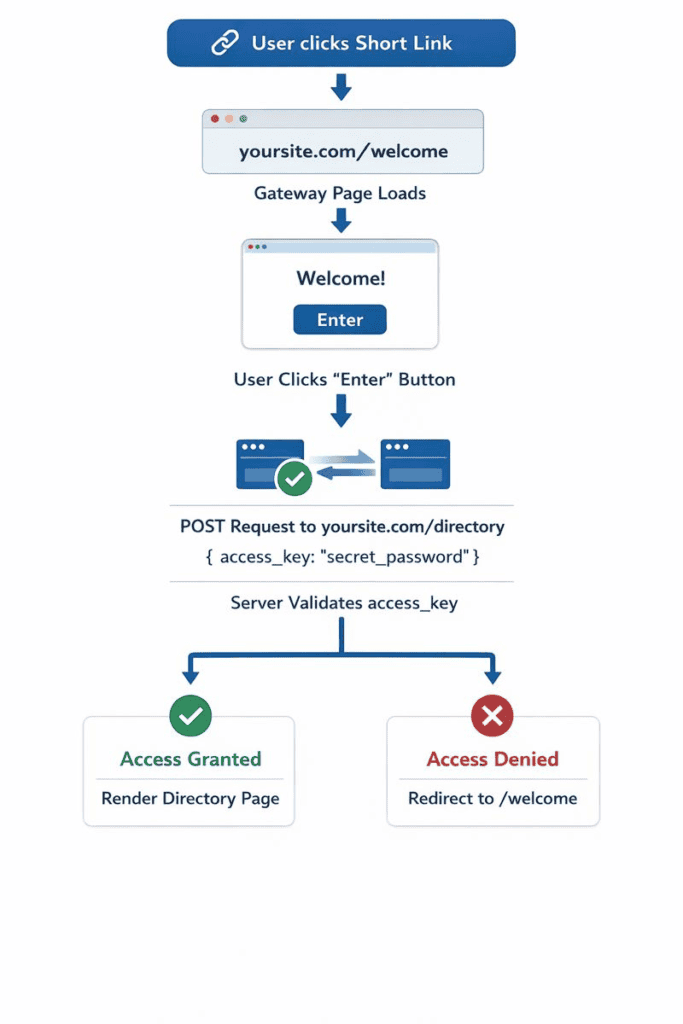
Why This Works:
- The shortened link (Kutt.it) points only to the gateway page, not the directory
- The gateway page contains no sensitive data—it’s safe to be public
- The password travels in the POST request body, invisible to URL-based exposure vectors
- Server-side validation occurs before rendering any sensitive data
- No credentials ever appear in the browser address bar or history
The Secure Gateway Solution Approach
The most robust solution combines two layers of protection: a privacy-focused link shortener and a server-side POST authentication mechanism.
Layer A: The Shield (short link)
Kutt.it is an open-source, self-hostable alternative to Bitly. The critical difference is that Kutt.it does not have a public analytics endpoint or “plus sign” preview feature.
What This Means:
- If someone tries to inspect your Kutt link, they see nothing
- The destination URL remains completely hidden
- No click statistics are publicly accessible
- Your internal gateway address stays secret
You can self-host Kutt.it on your own infrastructure or use the hosted version at kutt.it. Either way, the shortened link becomes a true barrier rather than a transparent redirect.
Alternative Options:
- yourls.org: Another open-source self-hosted option
- Custom domain redirects: Set up
go.yoursite.com/communityusing server-side 301 redirects - Any shortener WITHOUT public analytics endpoints
Layer B: The “Secret Handshake” (POST Button)
Instead of the link going straight to the directory, it goes to a Welcome Page. This page contains a single button with a hidden form field containing your password.
The Technical Mechanism:
When the user clicks “Enter,” the browser sends the password in a POST request body rather than the URL. This is the crucial security improvement.
HTTP Method Comparison:
GET Request (insecure):
GET /directory?password=secret123 HTTP/1.1
Host: yoursite.com
↑ Password is in the URL, visible everywhere

POST Request (secure):
POST /directory HTTP/1.1
Host: yoursite.com
Content-Type: application/x-www-form-urlencoded

access_key=secret123
↑ Password is in the request body, hidden from URLs
The POST request body is:
- Not logged in browser history
- Not included in referrer headers
- Not visible in the address bar
- Not cached by intermediate proxies (when properly configured)
What This Pattern Protects Against
✅ Browser history exposure
✅ Referrer header leaks
✅ Accidental URL sharing
✅ Link preview bot access
✅ Search engine indexing of credentials
✅ Server log exposure of credentials
What This Pattern Does NOT Protect Against
❌ Determined attackers with the password – If someone has the password, they can craft POST requests directly
❌ Password brute-forcing – Without rate limiting, attackers can try many passwords
❌ Man-in-the-middle attacks – Without HTTPS, passwords can be intercepted
❌ Session hijacking – Without proper session management, authenticated access could be stolen
❌ CSRF attacks – Without CSRF tokens, malicious sites could trick users into submitting the form
Essential Security Hardening for the Secure Gateway Pattern
All of this security is meaningless without TLS encryption. Always use HTTPS to prevent password interception:
| Security Measure | What It Is | What It Prevents |
|---|---|---|
| 1. HTTPS (TLS/SSL) Mandatory | Encrypted connection between user’s browser and your server | • Password interception by ISPs • WiFi network snooping • Man-in-the-middle attacks • Credential theft on public networks |
| 2. Rate Limiting | Restricts how many authentication attempts can be made from a single IP address within a time window | • Brute-force password attacks • Automated bot attacks • Dictionary attacks • Credential stuffing |
| 3. CSRF Protection | A unique, secret token embedded in your form that proves the request came from your actual website | • Cross-site request forgery • Malicious sites tricking logged-in users • Automated form submission attacks • Session riding |
| 4. Session Management | After successful authentication, server creates a temporary “session” so users don’t re-enter password on every page | • Authentication friction • Password exposure on every request • Poor user experience • Unnecessary repeated authentication |
| 5. Password Rotation Strategy | Planned, regular changing of the shared password with overlap period allowing both old and new passwords | • Access by former community members • Compromised passwords remaining valid • Shared passwords spreading too widely • Stale credentials |
| 6. Logging and Monitoring | Recording who attempts to access the directory, when, and whether they succeeded (without recording actual passwords) | • Unknown security breaches • Undetected attack attempts • Inability to investigate incidents • No audit trail |
1
This Is Not a Replacement for User Authentication
Important: The Secure Gateway pattern is designed for low-friction access to community directories with shared credentials. It protects against casual exposure and accidental leaks, but it is NOT equivalent to proper user authentication.
When to Use This Pattern:
- Small community directories (< 500 members)
- Data that’s private but not legally sensitive
- Groups where individual user accounts would create too much friction
- Content that’s inappropriate for public access but not highly confidential
When to Use Proper Authentication:
- Financial data
- Healthcare information (HIPAA-covered data)
- Legal documents
- Any data requiring audit trails of who accessed what
- Systems requiring individual user permissions
Platform-Specific Examples
Facebook Groups:
- Problem: Members comment on posts with directory links, accidentally creating a public trail
- Solution: Shared link goes to gateway only; even public comments don’t expose data
Slack / Discord:
- Problem: Link unfurling bots automatically fetch and preview URLs, potentially triggering unauthorized access
- Solution: Bot fetches only the welcome page, which contains no sensitive data
WhatsApp / Signal:
- Problem: Messages sync across devices, persisting URLs in chat logs and cloud backups
- Solution: Chat logs contain only the gateway URL; credentials never touch messaging infrastructure
Email Newsletters:
- Problem: Recipients forward emails, giving unintended people access
- Solution: Forwarded emails contain only the gateway link; recipients still need to click through
Conclusion
By moving authentication from the URL layer to the HTTP request body layer, you’ve eliminated the most common attack vectors for link-based access systems. The Secure Gateway pattern provides “one-click” convenience (one click to reach the gateway, one click to enter) while maintaining reasonable security for community data.
What You’ve Achieved:
- No password in URLs – Browser history, server logs, and referrer headers stay clean
- No accidental sharing – Copy-paste and screenshot sharing don’t expose credentials
- Platform independence – Works identically across Facebook, Slack, email, WhatsApp, and any other platform
- Bot protection – Link preview bots see only the welcome page, not sensitive data
- Minimal friction – Two clicks total, no login forms or accounts required
Key Security Principle:
The password moved from the user’s memory (brain) (or a shared URL) to a hidden HTML element. This seemingly small change has profound security implications because it keeps credentials out of all the places where URLs are logged, shared, and exposed.
Important Limitations:
This pattern protects against casual exposure and accidental leaks, but should be combined with additional security measures for highly sensitive data. For financial information, healthcare records, legal documents, or any data requiring individual accountability, implement proper user authentication with individual accounts.
The Secure Gateway pattern strikes a balance: it’s significantly more secure than URL-based authentication, much more convenient than traditional login systems, and appropriate for community directories where the goal is privacy without excessive friction.
As Always – Hoe this helps!
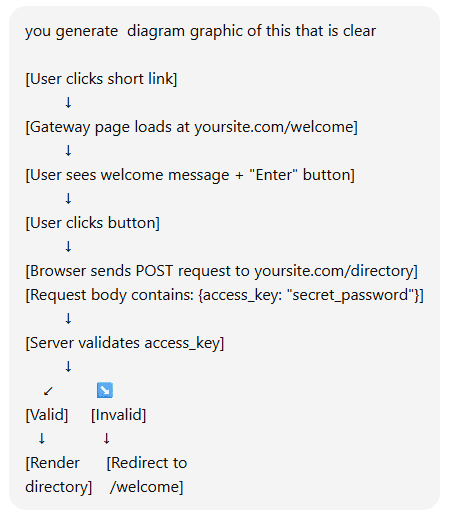
prompt for Image 1: