How to Build RAG: A Practical Guide
To learn more about Local AI topics, check out related posts in the Local AI Series
Have questions, ideas to share, or just want to connect? I’d love to hear from you! Check out my About Page to learn more about me or connect with me.
Part of: AI Learning Series Here
Quick Links: Resources for Learning AI | Keep up with AI | List of AI Tools | Local AI | AI Agents | Future of Work | Latest Token Prices
Disclaimer: I create this content entirely on my own time, and the views expressed here are mine alone (not my employer’s). Because I love leveraging new tech, I use AI tools like Gemini, ChatGPT, Claude, Perplexity and others as a “digital team” to help research and polish these articles so I can share the best possible insights with you!
Please see my other post on ChatBots and RAG
This has come up a number of times in my mentoring sessions and conversations with people and companies. Connecting an AI model to company documents sounds straightforward: upload the files, ask a question, and get an answer. Building something people can reliably use requires more than that.
But first, an important distinction: giving AI access to information does not always require retrieval-augmented generation, or RAG.
Context vs. RAG: What’s the Difference?
Context is the information a model has available when it generates a response. It can include instructions, conversation history, documents, and information returned by tools. If you provide a report and ask the model to summarize it, supplying that report directly may be all you need—provided the relevant material fits within the model’s context window.
RAG adds a selection step. Instead of supplying all the material upfront, the application searches a collection, retrieves relevant information, and places it into the model’s context before it answers. RAG is therefore a way of supplying context, not an alternative to context.
- Direct context: “Here are two proposals. Compare their implementation plans.”
- RAG: “Search our approved project documentation and explain the implementation requirements for this customer.”
In the first example, you have already selected the information. In the second, the system must find it. For a small, clearly defined collection, direct context can be simpler and preserve details that retrieval might miss. For a larger collection, RAG helps select relevant material without putting the entire collection into every request.
Some applications support both approaches. Open WebUI, for example, explicitly offers full-document context and focused retrieval. Uploading a document does not, by itself, tell you which method an application uses.
RAG Is Not Just a Developer Project
RAG is often described as a technical pipeline: split documents into chunks, create embeddings, configure a vector database, and connect a language model.
That is one implementation approach. It is not the only one.
You can also work with sources in NotebookLM, search Claude project knowledge, configure a Chatbase or Botsonic chatbot, connect a Copilot Studio agent to SharePoint, or deploy enterprise knowledge capabilities through Glean or Salesforce Agentforce. These products package different parts of the retrieval experience and require different levels of configuration and operational responsibility.
The practical question is not simply, “Which RAG platform is best?”
It is: “What do we need the application to do—and how much of it do we want to configure, build, and operate?”
How RAG Works
A typical RAG system has two connected workflows: preparing knowledge and answering questions.
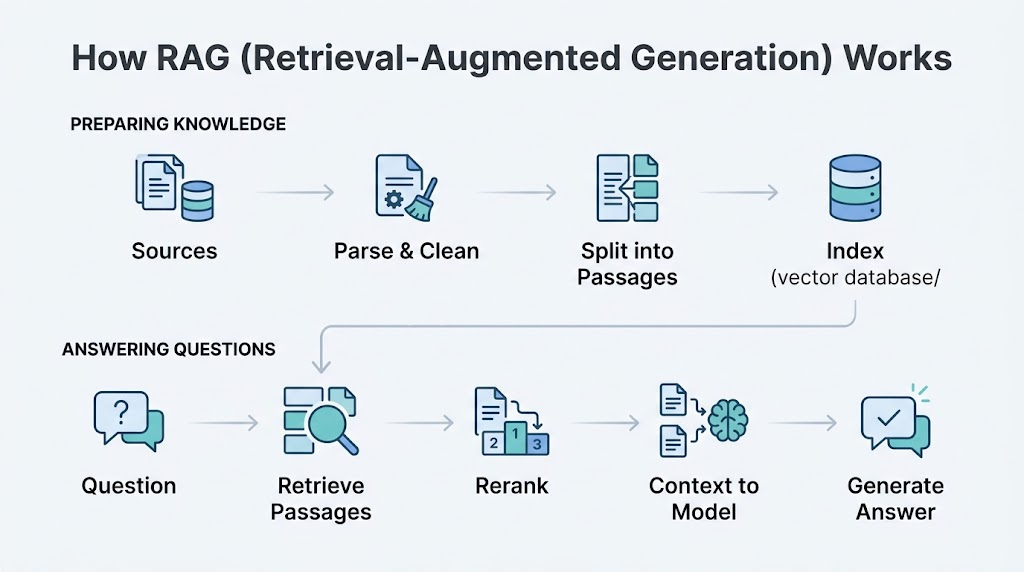
During preparation, the system extracts usable content from documents, divides it into searchable passages, and builds an index. That index may include embeddings—numerical representations that support searching by meaning. At question time, the application retrieves relevant information and supplies it to the model.[docs.cloud.google][learn.microsoft]
Some systems combine semantic retrieval with keyword search. This is useful when questions contain both natural language and exact terms such as product identifiers. A reranker can then reassess retrieved passages and move the strongest matches higher in the results.
RAG does not normally change the model’s learned parameters. It provides information when the model answers. Its effectiveness therefore depends on both the quality of the retrieved evidence and how accurately the model uses it.
The Platform Landscape: Six Implementation Levels
The market makes more sense when organized by implementation responsibility rather than presented as one long product list.
These levels are not a maturity ranking. A packaged application may be the right long-term solution, while a custom stack may introduce unnecessary complexity.
| Level | Approach | Representative options | Your primary responsibility |
|---|---|---|---|
| 1 | Use a knowledge-enabled workspace | NotebookLM, Claude Projects, ChatGPT Projects | Select sources, organize work, verify answers |
| 2 | Configure a packaged chatbot | Chatbase, Botsonic | Add knowledge, define behavior, test and deploy |
| 3 | Operate a configurable AI workspace | Open WebUI, AnythingLLM | Configure models, retrieval, knowledge collections, and hosting |
| 4 | Deploy enterprise knowledge and workflow agents | Glean, Copilot Studio, Salesforce Agentforce | Connect systems, manage access, design workflows |
| 5 | Build on managed cloud services | Amazon Bedrock Knowledge Bases, Microsoft Foundry/Azure AI Search, Google RAG Engine | Build the application around managed retrieval capabilities |
| 6 | Assemble a custom stack | LlamaIndex, LangChain/LangGraph, Haystack, search and vector infrastructure | Engineer and operate the pipeline and application |
These are practical groupings based on documented capabilities, not official vendor categories. Products can span multiple levels.
Level 1: Use a Knowledge-Enabled Workspace
This is the simplest starting point: bring information into an existing application and work with it.
NotebookLM
NotebookLM centers the experience on a selected collection of sources. Users ask questions and receive grounded responses with inline citations. Its distinction is the source-centered research experience: the documents are the foundation of the workspace.
An illustrative task is comparing several reports and identifying where they agree, disagree, or support a particular conclusion.
Claude Projects
Claude Projects combines ongoing work with project knowledge. Anthropic explicitly documents RAG for Projects, allowing Claude to retrieve relevant information from uploaded material rather than always loading all project content at once.
Its distinction is bringing knowledge retrieval into a continuing project workspace.
ChatGPT Projects
ChatGPT Projects organizes related conversations, files, and instructions and uses that context to support work such as research, writing, and planning.
It belongs in a practical discussion of knowledge-enabled AI, but with a qualification: using project information does not establish that every response uses retrieval. It is more accurate to describe Projects as a knowledge-enabled workspace than to label every interaction RAG.
When this level fits
Evaluate this approach when people need to work with a bounded collection of information inside an existing interface—not deploy a separate application.
Your main work is curating sources and verifying results rather than engineering the retrieval pipeline.
Level 2: Configure a Packaged Chatbot
This level moves from using an AI workspace to deploying an assistant for other people.
Chatbase
Chatbase provides a no-code workflow for creating agents from sources such as documents and websites. Its documentation covers adding knowledge, testing behavior, and deployment through website widgets and other channels.
Its distinction is packaging knowledge setup, conversational behavior, deployment, and customer-experience management into one service.
Botsonic
Botsonic provides a guided workflow for creating a bot, uploading knowledge files or adding links, configuring the experience, and embedding it on a website.
It is another example of a packaged knowledge chatbot rather than a developer framework.
What to compare
For this category, evaluate:
- Supported sources and update processes.
- Deployment channels.
- Behavior when information is missing.
- Human escalation options.
- Conversation review and analytics.
- Data handling and commercial terms.
Do not assume that accepting the same file types makes two platforms equivalent. Their setup workflows show similar entry points, but the full operational experience requires separate evaluation.
Also, document upload is sometimes marketed as “training.” That does not automatically mean the underlying model is being fine-tuned; Chatbase separately describes a retrieval pipeline involving document preparation, embeddings, retrieval, and prompt augmentation.
Level 3: Operate a Configurable AI Workspace
This category sits between a ready-made application and a custom build.
Open WebUI
Open WebUI provides knowledge collections and configurable document retrieval. Its documented capabilities include focused retrieval, full-document context, hybrid search, reranking, and connections to external vector infrastructure.[docs.openwebui][docs.openwebui]
Its distinction is exposing meaningful choices about how information reaches the model while providing an existing chat interface.
AnythingLLM
AnythingLLM packages document-based RAG and agent capabilities in an integrated application. It offers another route for teams that want a configurable knowledge workspace without building the whole experience themselves.
What to compare
This category is worth examining for local or hybrid AI requirements, but “self-hosted” should not be treated as proof that every processing step remains local.
Review the entire data path:
- Where are documents parsed?
- Where are embeddings created?
- Where is the index stored?
- Where are retrieved passages sent?
- Where does generation run?
An interface, embedding service, vector database, and language model can be separate components. Open WebUI’s support for external infrastructure illustrates why they should be reviewed individually.
Level 4: Deploy Enterprise Knowledge and Workflow Agents
Here, the problem expands beyond a selected document collection. The application must work with business systems, organizational identities, permissions, and workflows.
Glean: Knowledge Across Applications
Glean combines enterprise search, retrieval, and generated answers across connected business applications. Its distinction is the cross-system knowledge experience rather than a single notebook or website chatbot.
Access controls still require detailed evaluation. Glean’s Salesforce connector documentation, for example, distinguishes live retrieval using a requesting user’s authorization from indexed retrieval using connector-mirrored permissions.
The lesson is to inspect permission behavior for each connector rather than rely only on a platform-wide security description.
Copilot Studio: Agents Grounded in SharePoint
Copilot Studio can use a SharePoint folder or site as a knowledge source. Microsoft documents that a registered folder’s scope includes its subfolders, not parent or sibling folders unless separately registered.
An illustrative use case is an IT assistant grounded in an approved procedures folder rather than an entire SharePoint environment.
Microsoft also documents different ingestion paths: connecting a SharePoint URL and selecting files or folders through its unstructured-data upload experience. These should not be described as identical data paths.
Salesforce Agentforce: Knowledge Within Business Workflows
Agentforce Data Libraries ground responses in sources such as Salesforce Knowledge, uploaded files, and web content. Its standard knowledge-answering action retrieves relevant content to support responses.
Its distinction is the surrounding business application and agent workflow. RAG supplies knowledge within that broader experience; it is not the entire Agentforce platform.
What to compare
At this level, prioritize:
- Connector coverage.
- Identity and permission enforcement.
- Updates, deletions, and indexing behavior.
- Source references.
- Administrative controls.
- The separation between answering questions and executing actions.
Retrieval and actions are different capabilities. For example, Glean separately documents action packs that administrators can enable and configure.[glean]
Level 5: Build on Managed Cloud Services
Organizations building their own applications can use managed retrieval capabilities instead of assembling every component.
Examples include:
- Amazon Bedrock Knowledge Bases, supporting retrieval and response generation.
- Microsoft Foundry with Azure AI Search, supporting grounded generation over indexed information.
- Google RAG Engine, covering ingestion, transformation, indexing, retrieval, and generation.
These are application-building services rather than necessarily finished employee or customer experiences.
Evaluate this approach when a custom application is required but operating every retrieval component is not a useful differentiator. Compare source support, retrieval controls, integration requirements, service availability, and operating costs.
Level 6: Assemble a Custom RAG Stack
Frameworks such as LlamaIndex, LangChain/LangGraph, and Haystack help developers assemble ingestion, retrieval, and orchestration. Search engines and vector databases provide another layer beneath the application.
The distinction is important: a vector database is not a complete RAG application, and an orchestration framework is not a managed service.
A custom approach gives your team extensive design freedom, but also responsibility for integration, testing, deployment, and maintenance. Evaluate it when a specific requirement justifies that ownership—not simply because building the stack is possible.
How to Implement RAG Successfully
Regardless of platform, use a disciplined pilot.
1. Define a Specific Job
Start with a concrete task:
Help support engineers answer configuration questions using approved manuals and troubleshooting guides, with references to the supporting sections.
Specify users, source boundaries, acceptable answers, and what should happen when evidence is missing.
2. Prepare Authoritative Content
Treat ingestion as a quality-control process, not just a file upload.
For the pilot:
- Remove duplicates and obsolete versions.
- Preserve headings and document structure.
- Check tables and scanned pages.
- Retain source identifiers.
- Record useful metadata such as product, version, and effective date.
- Assign an owner for updates and deletions.
Parsing, transformation, and indexing are explicit stages in documented RAG workflows. A successful upload does not establish that the resulting content is usable.
3. Test Retrieval Separately from Generation
Create representative questions with expected sources.
If an answer is wrong, determine whether the system failed to find the evidence or the model misused evidence it received. Reranking addresses the relevance of retrieved material; it does not replace evaluation of the generated answer.[docs.aws.amazon]
4. Include Difficult Cases
Test more than easy questions:
| Test case | What it reveals |
|---|---|
| A clearly answerable question | Basic retrieval and answer quality |
| A question with no supporting source | Whether the assistant acknowledges missing evidence |
| Conflicting document versions | How the system handles source authority and freshness |
| An exact product identifier | Whether retrieval handles precise terminology |
| Restricted content | Whether access boundaries behave as intended |
| A question requiring several passages | Whether the answer integrates evidence accurately |
These are proposed pilot tests, not claims that every platform supports the same controls.
5. Measure Operational Fit
Assess response time, usage cost, source-update behavior, administrative effort, and answer quality.
Do not assume that connecting a source makes every update immediately available. Microsoft, for example, documents indexing considerations for SharePoint-backed knowledge.
6. Assign Ongoing Ownership
Decide who maintains the sources, reviews failures, manages access, and approves changes.
A packaged product can reduce engineering work. It does not decide which documents your organization considers authoritative or whether the assistant is fit for its intended purpose.
Choose the Level Before Choosing the Vendor
Start with the information problem. If the relevant material is small and already known, direct context may be sufficient. If the system must find evidence within a larger collection, evaluate retrieval.
Then decide what you want to own: a source collection, a configured chatbot, a controllable workspace, an enterprise agent, or a custom application.
That decision will produce a more useful shortlist than comparing NotebookLM, Chatbase, Glean, Agentforce, and a vector database as though they were interchangeable products. The right solution is the one that supplies reliable evidence for a defined task—with an implementation and operating burden your organization can sustain.
Resource and Further Reading
My Articles:
- Understanding AI: What is RAG?
- Understanding RAG ChatBot Operating Costs: A Practical Guide
- Optimizing WordPress Post Listing for RAG Systems
- Context, Retrieval, and RAG Fundamentals
- Knowledge-Enabled Workspaces
- Packaged Chatbots: Chatbase and Botsonic
- Configurable AI Workspaces: Open WebUI and AnythingLLM
- Enterprise Knowledge and Agents: Glean
- SharePoint and Microsoft Copilot Studio
- Salesforce Agentforce
- Managed Cloud RAG Services